
Sara Tinney
Module 6: Technology in Alberta Schools
Module 6 focused on technology in our schools. We discussed the importance of the Learning and Technology Policy Framework (LTPF) and other important documents. For the module assignment we were instructed to create a lesson activity using SMART Notebook and record a video of ourselves introducing the activity, the instructions and demonstrating the activity using an interactive whiteboard.
The SMART Exchange website is embedded below. This is a great website with educational resources that can be downloaded and used in your classroom. Click here to visit SMART Exchange.
I chose to create an activity that could be incorporated into a secondary science lesson. This activity could be altered to be used for grade 9, 10, 11 or 12. The level of information the students are required to research could be adjusted for the grade level. Pull tabs could be added with additional information about cells, organelles and processes to increase the complexity of the information targeted by the task. For the purpose of this assignment I kept my lesson activity simple. My lesson slides can be seen below.
My experience working with Interactive Whiteboards is limited so this assignment presented many challenges as I created a lesson, transferred the lesson to a SMART Board and recorded my video using my IPad. You can watch my video below.


Every lesson I create will include lesson objectives. These objectives will always be presented to my students at the beginning of each lesson and will remain available to them throughout the school year. I believe this will provide guidance through each individual lesson and through the class as a whole.
Every lesson I create will include lesson notes that outline the lessons agenda (i.e. instruction style, activity type, instructions and other important information). These notes will always be presented to my students at the beginning of each lesson and will remain available to them throughout the school year. I believe this will provide guidance through each individual lesson and through the class as a whole.
Teachers notes will not be shown to the students, but they will still be present in every lesson I create. This page helps to organize my lessons as an educator, reminding me of key aspects of the lessons location within my resources. If I choose to share my lesson with others (i.e. using SMART Exchange or another sharing site), these notes would also allow others to easily asses if this lesson would be relevant to their own classroom.
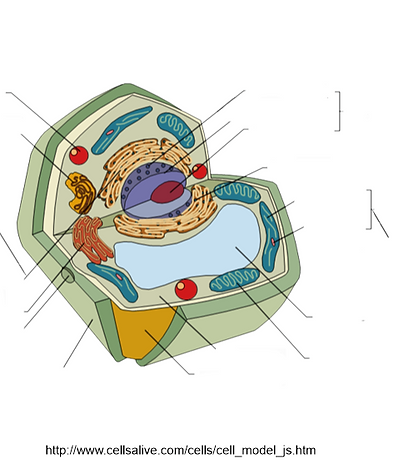
For this lesson I chose to create an answer and reveal type of activity. Students are required to come to the interactive whiteboard and fill in answers they know, or think they know, in the space provided. For this lesson, they need to fill in the cell type (i.e. Plant Cell or Animal Cell) and all of the indicated organelles. Once the diagram is filled in, students will take turns erasing answers to reveal the text beneath which will confirm or correct their knowledge.
I will also require students to use interactive cell models to explore cell structure further. You can explore the site I provide a link to in my lesson by clicking here.
This site also provides descriptions of the cell organelles that can supplement the information students will encounter in their textbooks.